


Find the Right Wireless Over-Ear Headphones Fast
Cut through noise and confusion to pick wireless over-ear headphones that match your needs. This practical guide helps you prioritize sound, comfort, and budget, test fit and audio, set up reliable wireless connections, and maintain peak performance for years ahead.
What You'll Need

Define Your Priorities: Sound, Comfort, and Budget
Do you want concert-level bass or all-day comfort? Pick one (or balance both) before falling for glossy marketing.Identify how you’ll use the headphones: commuting (strong ANC, compact folds), home listening (neutral tuning, wider soundstage), gaming (low latency, detachable mic), calls (clear mic, stable connection), or travel (long battery, comfortable pads).
Prioritize three main factors from this short list to filter options quickly:
Consider secondary needs like wired playback, microphone quality for calls, and brand support for firmware updates and warranties. Set a realistic budget band and pick three must-haves to eliminate models that don’t meet your daily needs. Knowing your use cases reduces overwhelm and narrows model choices to ones that truly fit your daily life.

Decode Key Specs and Features
Numbers don't lie—but what do they actually mean for your ears and daily use?Learn which specs matter and which are hype. Don’t judge solely by driver size — larger drivers can hint at stronger bass and dynamics, but the headphone’s tuning defines the sound. For example, a well-tuned 40mm driver can outperform a poorly tuned 50mm driver.
Check supported Bluetooth codecs (SBC, AAC, aptX, LDAC) and match them to your source. For example, iPhones pair best with AAC; many Android phones can use aptX or LDAC for higher fidelity or lower latency.
Check battery life with ANC on, and note real charge times and any fast‑charge claims (e.g., 10 minutes = 2 hours). Compare advertised runtimes using the same ANC state.
Understand ANC versus passive isolation: ANC reduces low‑frequency hum; passive isolation blocks mid/high frequencies with good pads. Confirm microphone design — multi‑element mics give clearer calls in noisy environments.
Consider these useful extras:
Use this knowledge to compare models apples-to-apples rather than being swayed by single impressive numbers.

Try Before You Buy: Fit, Comfort, and Sound Testing
Comfort matters more than brand—your ears will thank you after a four-hour test. Really.Audition headphones in person whenever possible, or insist on a generous return window if you buy online. Test multiple units to avoid a one-off fit or tuning quirk.
Wear the headphones for at least 15–30 minutes to evaluate comfort. Check these fit factors:
Bring a familiar playlist that covers sound signatures and quick examples (e.g., bass-heavy track, mid-focused vocal, detail-rich high end). Use spoken-word content—podcast or audiobook—to judge vocal clarity and presence.
Assess isolation and ANC by visiting a busy cafe or standing near a noisy street to see how hum and mid‑frequency noise are handled.
Evaluate microphone quality by recording a short voice memo on your phone (indoors and with some background noise) and listen back for clarity and sibilance.
Use the companion app’s EQ and presets to see how much tuning improves the sound.
Prioritize retailers with clear trial policies and easy returns when you can’t audition in person.
Setup and Pairing: Get the Best Wireless Connection
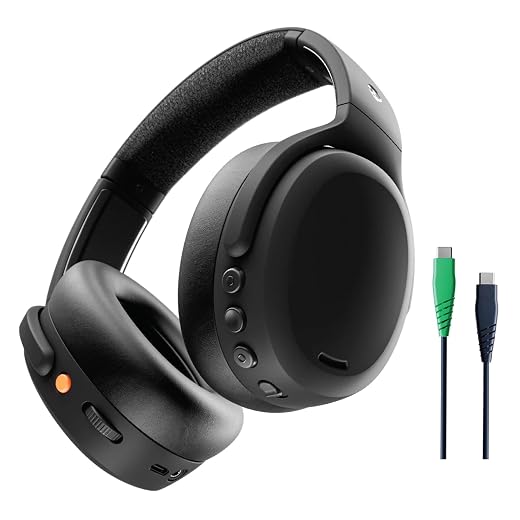
Stop blaming latency—proper setup makes Bluetooth sing. Quick tweaks deliver noticeable improvements.Charge the headphones fully before first use. Install the manufacturer app and check for firmware updates; update the headphones and app to avoid known bugs.
Pair the headphones to each device one at a time. Enable the highest supported codec on both ends—for example, AAC on iPhone, aptX/aptX Adaptive or LDAC on compatible Android devices. Use a wired connection or low-latency mode for critical audio/video sync.
Pair using these quick actions:

Maintain and Optimize Performance Over Time
Treat them well and they'll outlast trends—simple care extends life and sound quality.Clean ear pads regularly with a lint‑free cloth and a mild soap solution or the manufacturer‑recommended cleaner. Wipe sweat after workouts—this prevents odor and material breakdown.
Adopt small habits—proper storage, gentle cleaning, and regular updates—to keep performance steady for years.
Enjoy Your Sound
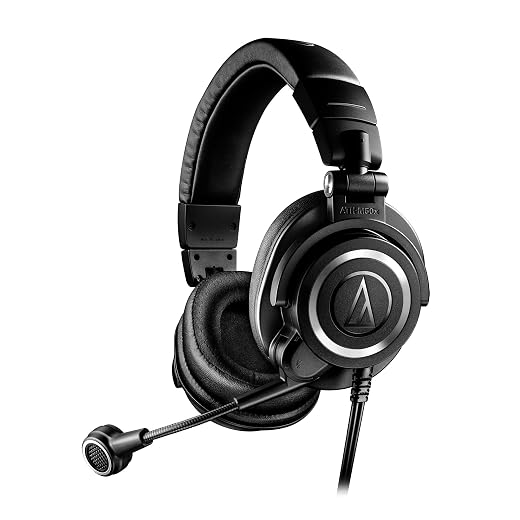
With clear priorities, informed comparisons, careful testing, and proper setup and maintenance, you’ll pick wireless over-ear headphones that sound great, fit comfortably, and last—ready for immersive listening and reliable daily long-term use, and enjoyment. Which recordings will you rediscover first?


Great guide — super clear on priorities. I especially liked the bit about balancing sound vs comfort. I ended up choosing comfort because I listen for hours and the clamping force on some models gave me a headache.
Quick question: how much should I discount battery life if I mostly use wired sometimes? Is 30 hours still realistic with mixed use?
Good question, Daniel — mixed use (Bluetooth + occasional wired) generally won’t significantly change the rated wireless battery life since wired mode usually bypasses the internal amp. But if you’re using ANC over Bluetooth a lot, that’s the bigger drain. Expect the rated 30 hours to be realistic if you toggle ANC off for wired sessions.
I can confirm — I use wired during work calls and Bluetooth for music. My 35h-rated set still gets close to the spec when I turn ANC off while wired. YMMV though, depends on model.
Loved the ‘Try Before You Buy’ section. Seriously, nothing beats feeling the headband and pads in person. The guide should maybe warn about store demo units being squashed and misleading on comfort — try multiple pairs!
Yesss, demo pads are brutal. I always ask staff if they have an unpacked box to try. If not, I rely on return policies instead — buy, test at home, return if needed.
Great point Sophie — demo units are often compressed. We added a note to the guide: wear them for at least 10-15 minutes and, if possible, try a brand-new pair (or read recent user reviews) to gauge long-term comfort.
Minor nitpick: in the ‘Decode Key Specs’ section, you mention impedance but don’t explain why it matters for portable use. A short line about pairing with phones vs dedicated amps would help novices.
Good catch, Noah — we’ve updated the guide to include a brief explanation: low impedance (<50 ohms) is generally easier for phones to drive, while high-impedance cans may benefit from an amp for maximum dynamic range.
Small rant: stores sometimes demo ANC headphones with music at max volume to hide hiss. That made me choose wrong once. Could the guide warn about listening levels during demos? Not everyone brings their phone and playlist.
You’re right — demos can be misleading. We’ve added a tip: bring your own low-volume playlist or ask staff to play quieter tracks so you can assess noise floor and hiss without cranking volume.
I’m torn between codecs — aptX vs LDAC vs AAC. I use an iPhone mostly, so AAC makes sense, but my Android supports LDAC. Does the guide recommend prioritizing codec or ANC?
Also remember latency for gaming/streaming — low-latency codecs or game modes help.
I’m Android-first and chose LDAC + decent ANC. Soundstage is prettty sweet but ANC matters most for flights. No single answer — think about where you’ll use them most.
Codec vs ANC depends on your use: if you prioritize hi-res streaming and have a device that supports LDAC (or aptX Adaptive), prioritize codec. If you want quiet environments (commute/office), ANC will give a bigger perceived improvement. For iPhone users, AAC is the best native option, so focus on ANC/comfort/battery instead.
Two things: 1) For gaming, latency is king — check for low-latency modes. 2) For travel, I found ANC + effective sealing beats pure ANC numbers. The fit matters more than advertised dB reduction.
Totally — I had ’10 dB better ANC’ on paper but a poor seal made it useless on planes.
For gaming: wired with a low-latency dongle > Bluetooth for competitive play. But for casual gaming, aptX LL or the vendor’s gaming mode is fine.
Excellent points. We’ve emphasized practical latency testing and the importance of seal/fit for real-world ANC performance in the guide.
Wanted to say thanks — the maintenance tips saved me money. Cleaning pads and replacing them every year kept my headphones comfy and smell-free. Also, small thing: store them loosely instead of clamping them in a tiny case.
Agree, and if you commute a lot, get an extra set of pads — rotates them and they last longer.
Happy it helped, Grace! Good call on storage. We recommend storing in a breathable pouch and avoiding extreme heat/humidity to prolong pad life.
Use a lightly damp microfiber cloth and mild soap if needed. Avoid alcohol on leather-like pads, and never soak them. For deep cleaning, follow manufacturer guidance.
Is there a particular cleaning spray you’d recommend? Or just a damp cloth?
I appreciated the setup & pairing troubleshooting tips. My only request: include a short checklist for multipoint pairing (like which device to pair first, resetting pairs, firmware quirks). That was a pain to figure out.
Thanks — multipoint killed my productivity until I found that pairing order trick. Also some brands have limits (2 devices max), so check the manual.
Nice suggestion — we’ll add a concise multipoint pairing checklist: 1) Factory-reset headphones, 2) Pair the primary device first, 3) Pair secondary device while primary is on, 4) Update firmware, 5) Reboot both devices if issues persist.
One of the best parts of the guide: the buying priorities checklist. I used it to pare down choices from 12 to 3. My only wish: include a printable version or a checklist PDF!
Nice idea — a printable checklist sounds handy. We’ll work on a downloadable checklist you can use in stores.
I tried the guide’s advice about checking mic quality for calls. Honestly, some of these ‘great for calls’ headphones still sounded tinny on Zoom. Maybe add a note about third-party mic tests or community feedback for specific models?
Solid point — mic performance varies a lot. We’ll add a section recommending checking recent call-recording tests on YouTube and user forums, and to prefer models with dedicated boom-mic or multi-mic beamforming for clearer calls.
I use a cheap clip-on lavalier for calls now — headset mic is fine for music but nothing beats a dedicated mic for long meetings.