


Why Sound Signature Matters for Wireless Over‑Ear Headphones
A sound signature describes how headphones reproduce different frequencies—bass, mids and treble—and shapes listening moments. For wireless over‑ear, tuning determines perceived clarity, instrument separation, vocal presence and the weight of bass. RIGHT signature makes music feel alive; the wrong one makes it flat or fatiguing.
Understanding tuning helps you match headphones to genres, environments and taste. Also reveals trade‑offs: emphasized bass can boost punch but mask details; bright treble can add sparkle yet increase fatigue. This guide dives into the acoustic, mechanical and electronic choices behind signatures and offers practical buying and customization advice.


Fundamentals: What a Sound Signature Is and How We Perceive It
What a sound signature practically means
A sound signature is simply the balance of energy across frequency bands and the resulting character you hear: how deep the bass is, how forward the vocals are, and whether cymbals sparkle or sting. Think of it as a painting’s palette—different mixes of bass, midrange and treble create distinct moods.
The frequency bands and what they do
Psychoacoustics: why we perceive some tunings as “better”
Human hearing is nonlinear. Loudness perception and equal‑loudness contours mean bass must be louder at low levels to “sound” equal. Masking occurs when strong bass or mid energy hides quieter details in neighboring bands. Cultural and listening-context factors (club vs. studio, mobile vs. quiet room) shape preference—someone commuting may prefer boosted bass; an audiophile may want flat, revealing sound.
Common descriptors you can use
Quick how‑to listening tips
Hardware and Design Elements That Shape Tuning
Sound signatures start in the hardware. Small engineering choices—driver type, enclosure, pads and ports—set the raw frequency balance before any DSP or codec touches the signal. Below I break down the physical levers designers pull and what they mean for the music you hear.
Driver type and size
Driver topology (dynamic, planar‑magnetic, electrostatic) determines transient speed, distortion floor and how easily low frequencies are produced. Larger dynamic drivers (e.g., 40–50 mm) often give fuller bass, while planar drivers excel at low distortion and speed—think punchy but controlled bass on HIFIMAN planars versus warm, impactful bass from many large dynamic drivers.
Enclosure: closed vs open
Closed backs increase perceived bass and isolation; open backs reduce low‑end buildup and produce a more natural, airy mid/treble image. In practice, an open headphone like many studio references will sound more “transparent” at the cost of bass slam and isolation.
Earcup geometry, pads and seal
Pad material and shape change coupling to your ear—thicker memory foam can boost perceived warmth and bass, while thin leather leans drier. A poor seal kills low end; swapping pads or adjusting clamp force is a quick tuning hack.
Porting and passive resonances
Ports and cavities tune low‑frequency roll‑off. Designers use small bass ports or tuned chambers to add controlled “boom.” Unmanaged cavities create resonant peaks that make bass boomy or treble harsh; internal damping materials (foam, wool) tame these.
Electrical & mechanical considerations
Impedance and sensitivity dictate how a source drives the headphone—low sensitivity may sound lifeless from a phone, while high impedance can change tonal balance with weak amplifiers. Mechanical damping (voice‑coil and suspension) shapes decay and midrange texture.
Manufacturing tolerances and QC
Even within one model, small assembly variances shift resonance and channel matching. Tip: buy from vendors with good return policies, audition multiple units when possible, and consult measured graphs from reliable reviewers to avoid a dud.
Electronics and Wireless Stack: How Bluetooth, Codecs and DSP Affect Sound
Codecs and bandwidth: what you lose (and keep)
Codecs determine the maximum audio detail that can be carried over Bluetooth. SBC and AAC are ubiquitous but limited; aptX and LDAC offer progressively higher bitrates (LDAC up to ~990 kbps) and can preserve more microdetail and dynamics. Real world tip: a phone that doesn’t support LDAC or aptX will force a lower codec, so even “hi‑res capable” headphones can sound ordinary with the wrong source. Think of codecs as the size of the pipe—bigger pipe, fewer compromises.
Bluetooth transmission: interference, range and latency
Wireless radio adds real variability. RF interference, packet loss and antenna design can introduce dropouts, micro‑pauses or subtle time smearing. Latency matters for video and gaming: SBC on smartphones often yields 150–300 ms; aptX Low Latency or aptX Adaptive can reduce this to tens of milliseconds. If you watch a lot of streamed video, prioritize low‑latency codecs and stable antenna implementations (some earbuds use dual‑antenna designs to reduce dropouts).
DSP, firmware and active features: the final voicing
Manufacturers use DSP to tune the raw hardware. EQ, dynamic bass enhancement, spatial virtualization and adaptive EQ can radically reshape the signature—ANC often attenuates high frequencies or alters transient feel, while bass boosts can mask midrange detail. Firmware updates can improve or break voicing; I’ve seen ANC firmware rollouts that tightened bass but dulled vocals. Features to watch:
Practical checklist before you buy or tune
Next up: how to measure and critically listen to these tuning differences so you can objectively evaluate what you hear.
Common Sound Signatures and Their Strengths and Weaknesses
Neutral / Flat
A neutral signature aims to present music without coloration—accurate, balanced mids, controlled bass and natural treble. It’s the “truthful” starting point for engineers and critical listeners.
Quick tip: If you want accuracy but crave a touch more warmth, add a slight +2–3 dB bump around 80–120 Hz.
V‑shaped
Boosted bass and treble with recessed mids—popular in consumer headphones because it emphasizes punch and sparkle.

Bass‑Boosted
Low-end heavy, sometimes with sub-bass emphasis and softer treble.
Warm / Laid‑Back
Smoothed treble and slightly enhanced lower mids for a mellow, forgiving sound.
Bright / Detail‑Focused
Elevated upper mids and treble to reveal microdetails and texture.
Practical selection rule: match signature to your main use—choose excitement for commutes/gym, neutrality for work, and warmth for long, relaxed listening.
Measuring and Evaluating Tuning: Objective Metrics and Critical Listening
Objective tools and what they tell you
When you want to move beyond impressions, a handful of measurements gives a clear map of a headphone’s tuning. Key metrics:
Practical tools range from lab-grade analyzers (Audio Precision, Klippel) to consumer-friendly options like miniDSP EARS plus REW software, and published third-party graphs from sites such as Rtings or InnerFidelity that can save you time.
Practical critical‑listening checklist
Use a short, consistent routine to compare phones quickly:
Reconciling numbers with your ears
If measurements say a 6 dB treble bump but you don’t hear harshness, consider your listening volume, track mastering, and ear sensitivity. Measurements explain “what” and “how much”; your ears decide “acceptable.” Use data to shortlist candidates and the checklist to pick what feels right for your music and life.
Tuning, Customization and Buying Strategy for Wireless Over‑Ear Headphones
Quick tuning steps: EQ presets and parametric EQ
Start simple: try manufacturer presets, then switch to a parametric EQ for surgical changes. Practical how‑to:

Leverage app tuning and firmware updates
Check the headphone app for custom profiles, presets and presets per-device. Treat firmware updates as tuning events—manufacturers sometimes improve ANC, latency, or codec handling. Look at changelogs before buying used gear.
Physical tweaks: pads, clamp and seal
Swap pads (velour vs. leather) to change perceived bass and treble: leather closes the cup and usually tightens bass; velour opens sound and softens highs. Adjust or break in the clamp gently—too tight hurts comfort and too loose kills bass seal. Small fit changes can equal a 3–6 dB shift in bass response.
When to rely on ANC or Transparency
Use ANC for noisy commutes and flights; it can reduce masking so you need less volume. Use transparency for situational awareness (traffic, announcements). If music sounds hollow with ANC on, try tuning EQ or lowering ANC strength.
Buying framework & audition checklist
Match tuning to use:
Prioritize for wireless: supported codecs (LDAC/aptX Adaptive), Bluetooth version, battery life, latency, ANC effectiveness, microphone performance, and firmware support. At audition, level‑match, use familiar tracks, test latency with video, try apps and repeatable real‑world scenarios.
Now move on to the article’s Conclusion for guidance on choosing the right tuning for your listening life.
Choosing the Right Tuning for Your Listening Life
Understanding tuning means balancing measurable behavior and personal taste. Use frequency response graphs, distortion and latency numbers to weed out glaring problems, but trust your ears for texture, impact and fatigue. Experiment with different genres, listening levels and EQ presets to reveal how a signature performs in real life.
Prioritize headphones that pair strong wireless performance—reliable connection, low latency and good codec support—with a tonal balance you enjoy. Don’t be afraid to apply light EQ or profile swaps; small adjustments often unlock a much better fit for your listening life. Try before you buy, and iterate until it feels right.


Short take: Audio-Technica ATH-M50xBT2 are sick for tracking and casual listening. Punchy, clear mids. Not the widest stage but super reliable for home use.
Agreed — the M50xBT2 is a nice balance for monitoring-leaning tuning in a wireless package.
They’re my go-to for mixing on the go. Just watch the bass boost if you need translation to car speakers.
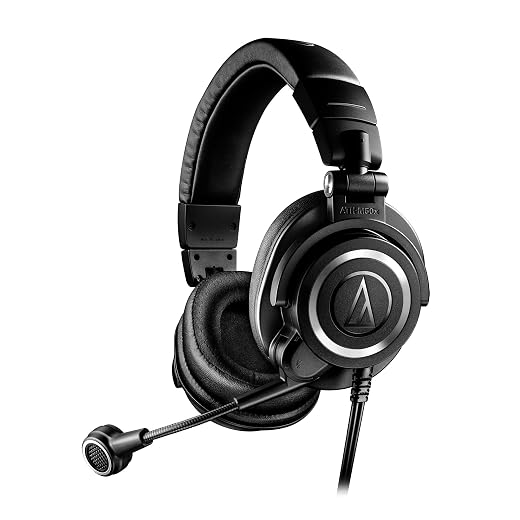
For streamers: the Audio-Technica ATH-M50xSTS-USB StreamSet looks tempting. The article’s buying strategy section helped, but can anyone who actually streams confirm whether that bundle is worth it vs getting an M50xBT2 + separate USB mic?
On a budget but want decent monitoring & simple setup.
If latency while monitoring is a concern, go wired for headphones and invest in a good mic. The bundle is nice for beginners though.
I used the StreamSet for a year — great for quick setups and low hassle. But when I wanted better mic control and latency management, I moved to a separate USB preamp + wired cans.
If you want a plug-and-play streaming rig, the StreamSet is convenient and tuned for streaming clarity. But for flexibility and better monitoring, a dedicated mic + ATH-M50xBT2 (or wired M50x) often yields higher-quality audio overall. It depends on priorities — simplicity vs upgradeability.
Really appreciated the deep dive into Bluetooth stacks. Quick questions from a nerd: will the arrival of aptX Lossless and higher-res Bluetooth make tuning less relevant, or just change how manufacturers optimize DSP for frequency response and latency? Also, how does codec variability between devices skew measurement results?
Also remember Bluetooth retransmissions and packet loss on congested networks can change perceived sound — not just the codec itself.
Great questions. Higher-bandwidth codecs reduce information loss, so they make it easier for tuning to be faithfully reproduced — but tuning remains crucial because drivers, ports, and EQ/DSP determine the curve. Codec variability can show different spectral tilt and transient behavior in measurements; we always note the codec used during testing for reproducibility.
Exactly — environmental factors and host implementations matter a lot in real-world use.
TL;DR: codecs = better fidelity, but drivers/DSP still call the shots. And yes, always document the codec when measuring.
Would love a follow-up comparing the same headphone across codecs with a consistent measurement setup. That’d be super useful.
Funny bit about battery life vs tuning — I feel personally attacked when my headphones die mid-commute.
JBL Tour One M2: great ANC, decent tuning, but they sneakily make you charge them every other day if you enable all the features. Anyone found a sweet spot for settings to extend battery without losing sound?
I switch to mono calls-only mode and turn off spatial features when commuting — battery lasts way longer and sound still good.
Try disabling extra ambient modes and lowering ANC intensity if the model allows it. Also turn off constant touch controls/voice assistant if you don’t use them — small power draws add up.
Great deep dive — I appreciated the section on how codecs and DSP shape the final sound. Quick thought: I’ve compared the Sony WH-1000XM6 and the Bose QuietComfort Ultra and the Sony feels warmer to me on pop/hip-hop while the Bose is more neutral but wider in the soundstage.
Anyone else notice the same when switching between LDAC and AAC?
Yep — on my Android phone LDAC + WH-1000XM6 sounds more textured. On iPhone (no LDAC) the Bose sometimes wins for clarity. Your mileage may vary based on phone and DSP settings.
Try switching off the Sony’s ‘adaptive sound control’ and set EQ flat — it gets closer to that neutral Bose vibe for me.
Nice comparison, Ethan. LDAC usually does give more detail/extension compared with AAC on compatible devices, which can make the XM6 feel fuller. But Bluetooth stability and device pairing also affect the perceived result.
Really liked the Measuring and Evaluating section — the combo of objective metrics + critical listening is the only sane approach. A couple of thoughts:
1) Measurements don’t capture fit/earcup seal and how that affects bass — two people can get different bass from the same cans.
2) The article mentions target curves but I’d love a short list of presets: e.g., ‘Podcast/Voice clarity’, ‘EDM/Club bass’, ‘Classical/Reference’ — and which models lean toward each.
Thanks for the thoroughness — this is the kind of content headphone nerds need more of.
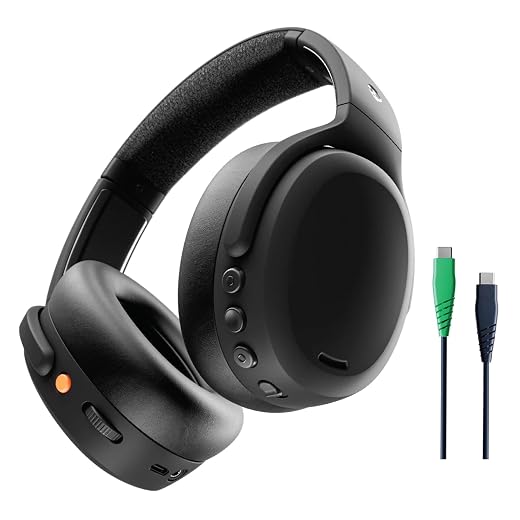
For your presets: Bose QC for podcast/voice, Skullcandy Crusher for EDM (if you like heavy LF), Sennheiser HD 600 for classical/reference — roughly speaking.
Good practical tips — we’ll include EQ app suggestions and a preset mapping in the next update.
Totally agree on seal/fit — we hinted at it but will expand with earcup/earcoupling tips. And nice idea on preset lists — we can add a quick-reference chart mapping signatures to listening profiles.
Also consider custom EQ profiles — some apps let you save presets per device and that solves a lot of tuning mismatches.
Good article overall but small gripe: listing the Sennheiser HD 600 as part of a “wireless over-ear” roundup feels misleading. HD 600 is wired, open-back, and a reference — totally fine to mention for tonal comparison, but the placement should be clearer.
Fair point, Noah. We included the HD 600 as a tonal/reference benchmark when discussing neutral/open tuning, not as a wireless competitor. We’ll clarify that in the article copy to avoid confusion.
Agree — HD 600 is still useful to reference when talking about what ‘neutral’ should feel like even if it’s not wireless.
Nice article. Quick consumer question: for a daily commuter who wants noise canceling + balanced sound and calls sometimes — Bose QuietComfort Ultra vs Sony WH-1000XM6? I care about ANC, battery, and overall tuning that won’t fatigue on long rides.
Both are excellent. Bose tends to have flatter tuning and arguably better ANC performance in some conditions; Sony has more feature depth and customizable EQ. If calls and long-wear comfort are top priorities, Bose often edges out. If you want tunability and a bit more bass presence for media, go Sony.
I’d pick Bose for comfort and ANC, Sony for media features. Try both if you can — fit matters a ton for commute comfort.
Also check call quality in noisy environments — different phones interact differently with each headphone’s mics. Read recent call tests before buying.